Cadence
A hybrid-performance brain.
Four channels of live inputs and beatgrid players under DJ-style hands, a sample-accurate MIDI clock that the rest of your rig follows, and an assist layer that can hold the mix together while you play hardware on top. Whatever you play over it, a keyboard or the synth on the desk, records back onto the channel it came from as a loop.
Inside Cadence
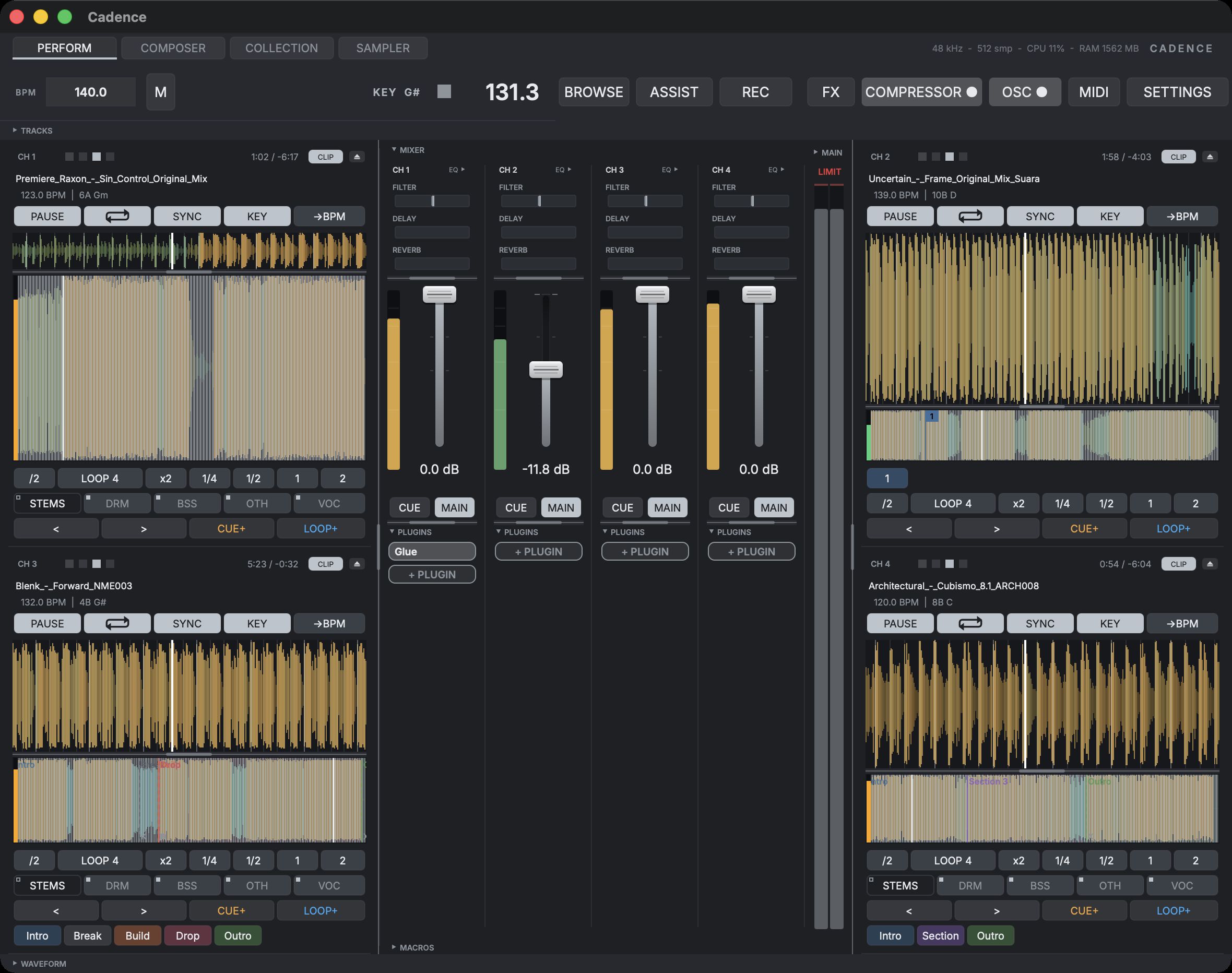
Four views, one surfacePerform — the mixer: four strips, each running a live input or a deck from your collection, under one master section.
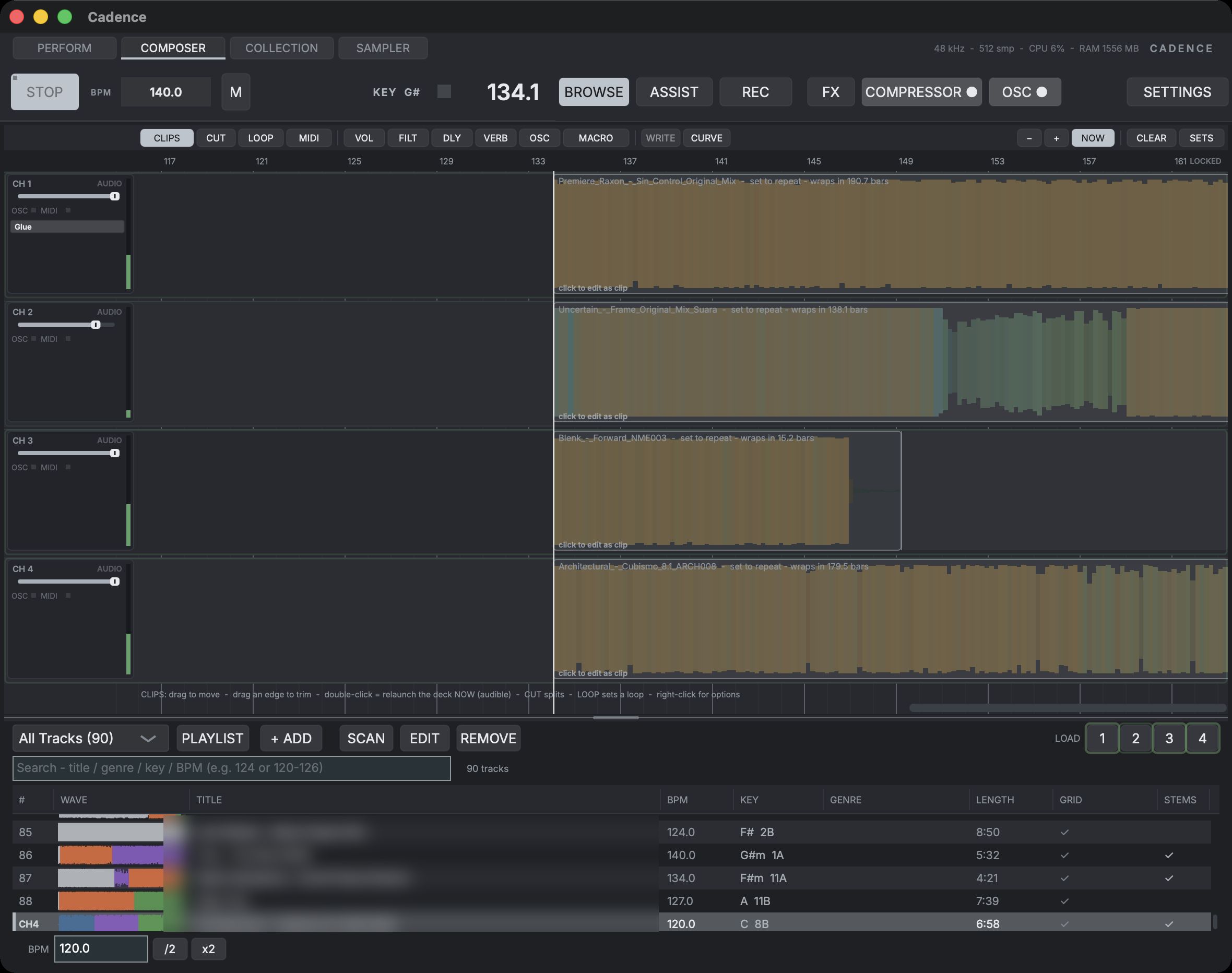
Composer — a bar timeline where the set is laid out in advance: one lane per channel, audio clips and MIDI blocks on the lanes, automation drawn underneath, and its own PLAY as the transport for the arrangement.
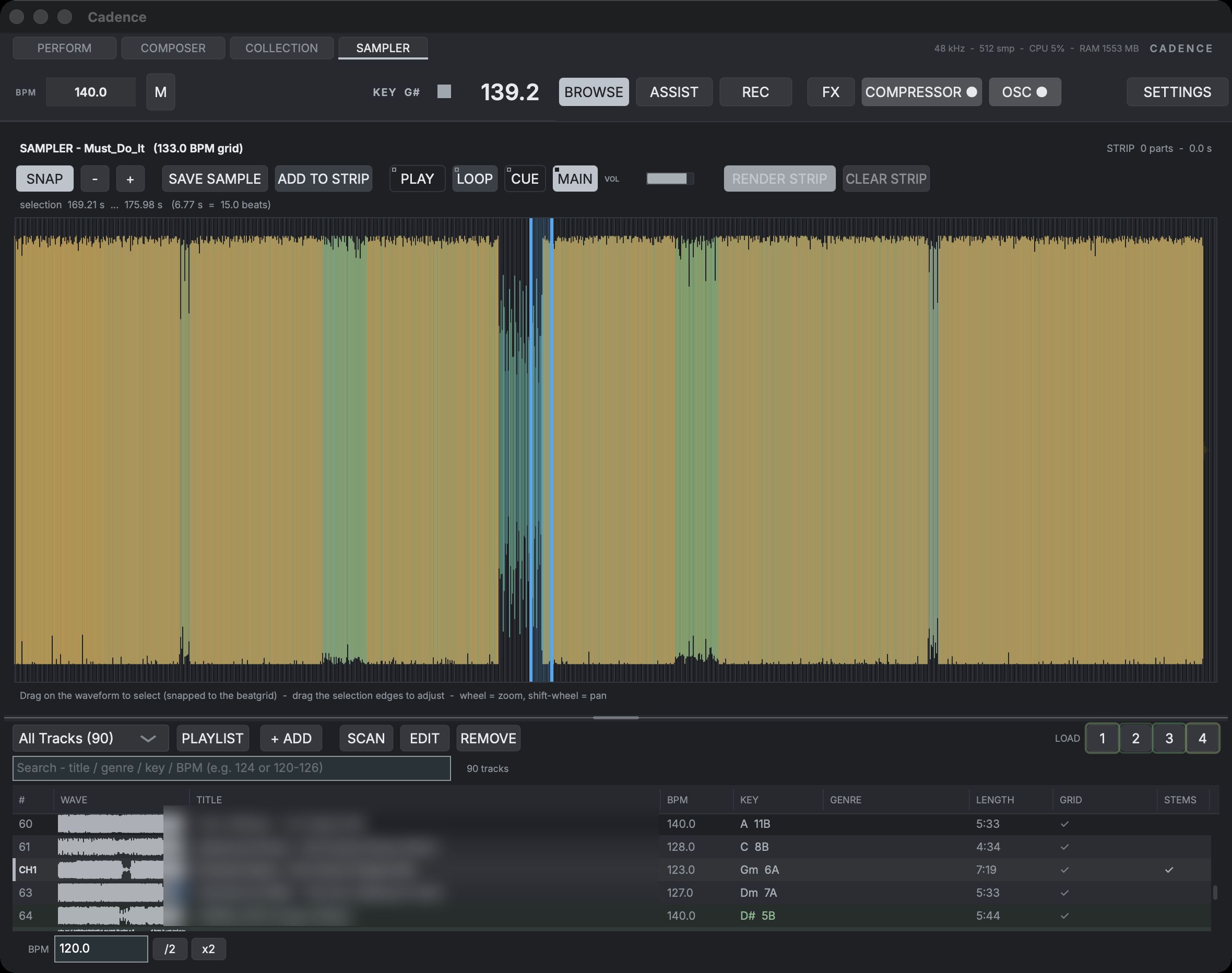
Sampler — a non-destructive editor for snipping regions out of tracks: select on the beatgrid, audition through the Sampler's own voice, then save the piece, or collect regions into a strip and render them as one crossfaded clip.
The fourth view is the Collection, the library you load from. Scanning reads tempo, a bar-accurate beatgrid, the musical key and the loudness the auto-gain works from. The table then carries a waveform, BPM, key, genre, length, grid confidence and stems status for every track. Search filters as you type on a word, a key or a BPM range, and while a deck plays the tracks in a compatible key tint green. LOAD 1 to 4 above the table put the selected track on a channel, each button lit by that channel's live level so you never load over a playing deck. Music comes in through Add Files, or through Import XML for a rekordbox collection with its playlists, curated beatgrids and hot cues.
What it is
One surface for the whole set
Live inputs, prepared clips and hardware all meet on the same four channels. Cadence holds the tempo, the grid and the structure of the set in one place, so there is a single thing to look at when the room is dark and something needs to change now.
Everything follows Cadence
A sample-accurate 24-PPQN MIDI clock, phase-locked to the audio clock rather than driven by a timer, with transport start and stop and tap tempo. Cadence is built to be the one clock in the room, not another device negotiating for sync.
Play hardware on top
The assist layer can carry a transition on its own — key-aware, paced how you like it, looping the build into the drop. That buys you both hands for the modular, the drum machine or the synth, and you take the mix back whenever you want it.
Capabilities
Four channels, DJ ergonomics
Each channel takes a live input or its own internal player. Three-band EQ with full kills, one HP/LP filter knob per channel in the DJ idiom, a pre-fader cue bus with selectable master and cue output routing, and master metering. Per-channel delay and a shared reverb send sit on the same strip.
Hardware locked to the grid
24-PPQN MIDI clock out, sample-accurate and phase-locked to audio, driving eurorack, Elektron boxes and drum machines with transport start and stop. Tap tempo for anything unclocked, and an OSC broadcast of beat, phase and tempo for software on the network.
Beatgrid-native clips
Quantized bar launch, warp and vari-speed sync to the master tempo, flexible grid with key-lock, eight hot cues and cue preview from the browser. Waveform lanes show phase and sync against the beat grid, so you can see whether two decks land together.
A set laid out in advance
A bar timeline with one lane per channel: full-length clips, MIDI blocks and hand-drawn automation, under its own PLAY. Zoom runs from a whole set on one screen down to a sixteenth note, the piano roll selects and edits notes in bulk, and the rows of the key the app has resolved are lit as you write. Saved and reloaded as a Composition.
It reads the track
Automatic beatgrid and structure detection marks intro, break, drop and outro, with auto-sections snapped to bars, mood descriptors and clip-safe gain. The library stores the analysis, so a track you prepared once stays prepared.
An auto-DJ layer you steer
Key-aware transition modes, adjustable pacing, a build-up loop into the drop and FX ramps. When tracks are separated, transitions use the stems themselves — real bass swaps and vocal handovers, not just EQ moves. Hand it the next stretch and it holds the mix; take it back mid-transition and nothing jumps.
Mapped to your gear
MIDI-learn on everything, with A/B bank switching so a small controller still reaches the whole surface. A phone remote joins over the local network by QR code. OSC broadcasts clock phase, beat, BPM and transport alongside master band energy, kick onsets, per-stem levels and a drop-aware intensity signal.
Two surfaces, one switch
Cadence comes up in the Index look: the design language of this site turned dark, square and ruled rather than boxed, with type set by role instead of by whatever height a control happened to have. Classic, the surface Cadence had before it, is still a setting, and the switch is instant with nothing dropping out of the mix.
Stems
Drums · Bass · Other · VocalsCadence separates a track into its four parts on your machine — no cloud, no upload — and then treats them as performance surface: kill a vocal, keep the drums under the next tune, solo a bassline, and let the auto-DJ trade basslines instead of EQ bands.
Four parts, on your machine
One right-click separates a track into drums, bass, other and vocals with a state-of-the-art neural model running locally — around forty seconds for a club track on Apple Silicon. Results live in the library cache, so a track is only ever separated once.
Kills that land on the bar
Each stemmed deck grows four mute chips and a solo per part, all quantized to the grid — a queued kill blinks until the bar line and drops exactly on it, or shift-click for an instant stab. Key-lock holds pitch throughout, and every chip is MIDI-learnable.
The auto-DJ mixes with the parts
Transitions become stem-aware when the material allows it: bass swaps trade the actual basslines on the swap bar, the incoming vocal waits until the outgoing one is out of the way, and with both tracks separated it hands over drums first, then bass — the way you would.
Recording
The mix · MIDI takes · audio takesCadence records the mix that leaves it, and it records into itself: a part played on a keyboard, or a synth standing on the desk, is captured on the channel it arrived on and left looping there.
Count in, play, it loops
Arm a channel and the count-in starts on the next bar line rather than under your finger, because a loop that began where the mouse landed could never come back in phase. The click is forced audible for the count, the recording stops itself at the loop length you chose, and the loop starts immediately in the phase you played it. One shared menu sets loop length and count-in bars for every kind of take.
Three places to record into
Record a MIDI device onto a Perform channel, onto a Composer lane, or into the clip open in the note editor. Quantize is a sensitivity rather than a switch: it moves note starts and leaves the durations you played alone, so a take tightens without losing its phrasing. Snap to key moves an off-key note to the nearest one in the key the app has resolved, and does nothing at all when no key resolves.
The synth in the room, on the grid
Record a hardware synth on a live input, or a hosted instrument you are playing, as a looping clip on the channel or as a clip in a composition. The tap sits after the channel has made its sound and before it shapes it, ahead of the EQ, the filter and the sends, so the loop is still yours to tweak afterwards. The take is latency-compensated, with a manual trim for interfaces that misreport, and it is born on the master grid rather than handed to a beat detector.
The set, as it went out
The master button records the master bus, after the compressor and the limiter, as a 24-bit WAV. It runs independently of the channel takes, so recording the night and recording a loop into channel 3 are not a choice.
The bundle
The full SHLabs studioBuilt to perform together
Phosphor listens to Cadence over OSC and locks the visuals to the clock. Motion lands on the beat, parameters move with bass, mid and high energy, kicks flash, and the image surges when the drop arrives and settles back through the breakdown. This is how the two apps already behave together, not something on a roadmap.
Clock, structure, energy
Beat and clock phase, BPM and transport, master band energy across bass, mid and high, kick onsets, and a drop-aware intensity signal — plus live per-stem levels and drum-stem onsets when a deck plays separated stems. Broadcast continuously over OSC while you play.
Visuals on the same grid
Scene motion locks to beat phase, reactive parameters follow the bands, kick onsets fire shockwave ripples, and intensity drives the whole image up into the drop — fullscreen on the projector.
And the bundle is the whole studio: alongside Cadence and Phosphor it includes Cell, Schlagzeugs, Contour, Spazio, Lacuna, Glue, Stesso and Tonnetz — every instrument, effect and mastering tool in the line.
Schlagzeugs already speaks Cadence's language: the Beats assist writes a drum clip on the General MIDI drum map, which is the map Schlagzeugs plays by default.
Lacuna follows Cadence's key: with Follow on, its six resonances retune to the key of the deck Cadence plays, in whatever host Lacuna runs on the same computer.
A Tonnetz link — Cadence following and steering harmony via note-follow over OSC — is planned for the bundle.
Bundle pricing announced at release.
Influences
Cadence's performance workflow owes an honest debt to deadmau5's Autopilot. Its DAW-style set preparation and hybrid performance thinking pushed us to ask how much of a set can be prepared in advance before it stops being a performance and becomes a playback.
Cadence goes its own way from there: it is a hardware-first brain, putting out a sample-accurate MIDI clock that your modular and drum machines follow; it is open at the edges, broadcasting clock, structure and energy over OSC to a paired video synth that reacts to the shape of your set; and every control on it maps to whatever gear you already own.
Get it
Cadence is a premium SHLabs app in active development. This page is an early look.
The macOS and Windows builds are in beta testing. Pricing and availability are announced when it ships. For early access, or if you want to know whether Cadence will clock the specific box on your desk, write to us.